
What is GitHub Actions?
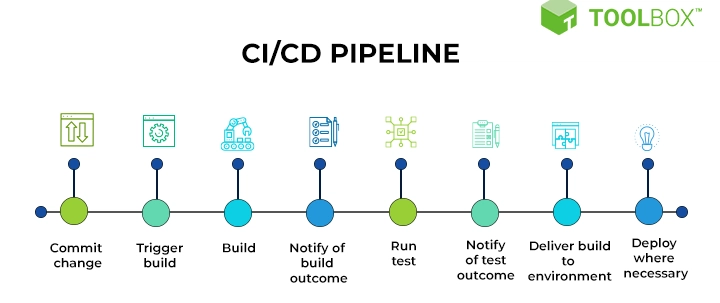
GitHub Actions is a continuous integration and continuous deployment (CI/CD) tool that allows you to automate your software build, test, and deployment pipeline. It is a powerful tool that enables you to create custom workflows to automate your software development lifecycle. With GitHub Actions, you can automate tasks such as building and testing your code, creating and publishing packages, and deploying your application to production.
Main Features
GitHub Actions provides a range of features that make it a powerful tool for automating your software development pipeline. Some of the main features include:
- Customizable workflows: Create custom workflows to automate your software development pipeline.
- Automated testing: Automate your testing pipeline to ensure that your code is thoroughly tested before it is deployed to production.
- Continuous deployment: Automate the deployment of your application to production.
Installation Guide
Step 1: Create a GitHub Actions Workflow File
To get started with GitHub Actions, you need to create a workflow file in your repository. A workflow file is a YAML file that defines the steps that GitHub Actions will execute when it runs your workflow.
To create a workflow file, navigate to your repository and click on the Actions tab. Then, click on the New workflow button and select the Blank workflow file template.
Step 2: Define Your Workflow
In your workflow file, you need to define the steps that GitHub Actions will execute when it runs your workflow. You can define these steps using YAML syntax.
For example, you can define a step to build your code using the following YAML syntax:
steps:
  - name: Build
    run: |
      npm install
      npm run build
GitHub Actions Snapshot and Restore Workflow
What is a Snapshot and Restore Workflow?
A snapshot and restore workflow is a type of workflow that allows you to create a snapshot of your repository at a particular point in time and then restore it to that point in time if something goes wrong.
How to Create a Snapshot and Restore Workflow
To create a snapshot and restore workflow, you need to define a workflow that uses the actions/checkout action to checkout your code and then uses the actions/upload-artifact action to upload a snapshot of your repository.
For example, you can define a snapshot and restore workflow using the following YAML syntax:
steps:
  - name: Checkout code
    uses: actions/checkout@v2
  - name: Upload snapshot
    uses: actions/upload-artifact@v2
    with:
      name: snapshot
      path:.
GitHub Actions vs Alternatives
What are the Alternatives to GitHub Actions?
There are several alternatives to GitHub Actions, including:
- Jenkins: Jenkins is a popular CI/CD tool that allows you to automate your software development pipeline.
- CircleCI: CircleCI is a cloud-based CI/CD tool that allows you to automate your software development pipeline.
- Travis CI: Travis CI is a cloud-based CI/CD tool that allows you to automate your software development pipeline.
How Does GitHub Actions Compare to Alternatives?
GitHub Actions is a powerful tool that provides a range of features that make it a popular choice for automating software development pipelines. However, it may not be the best choice for every project.
In comparison to alternatives, GitHub Actions provides:
- Tighter integration with GitHub: GitHub Actions is tightly integrated with GitHub, which makes it easy to automate your software development pipeline.
- Customizable workflows: GitHub Actions provides customizable workflows that allow you to automate your software development pipeline.
- Automated testing and deployment: GitHub Actions provides automated testing and deployment features that make it easy to ensure that your code is thoroughly tested and deployed to production.
Conclusion
GitHub Actions is a powerful tool that provides a range of features that make it a popular choice for automating software development pipelines. With its customizable workflows, automated testing and deployment features, and tight integration with GitHub, GitHub Actions is a great choice for automating your software development pipeline.
We hope this article has provided you with a comprehensive overview of GitHub Actions and how it can be used to automate your software development pipeline. If you have any questions or need further assistance, please don’t hesitate to contact us.
Download GitHub Actions Tutorial
If you want to learn more about GitHub Actions, we have created a comprehensive tutorial that covers everything you need to know to get started with GitHub Actions.