
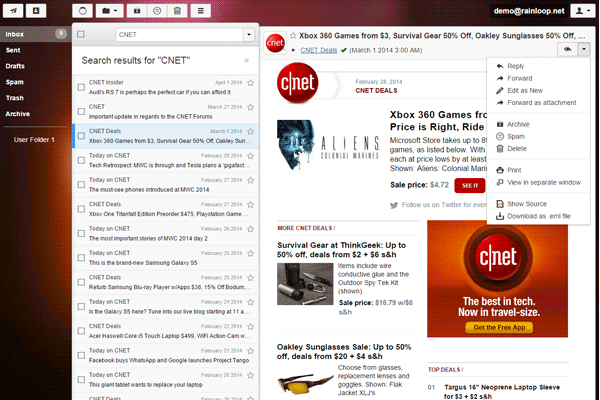
What is Rainloop?
Rainloop is a popular, open-source web-based email client that provides a simple and intuitive way to manage email accounts. It offers a range of features that make it an attractive alternative to traditional email clients, including a user-friendly interface, support for multiple email accounts, and robust security features. In this article, we’ll take a closer look at Rainloop, its key features, and how to use it to streamline your email management.
Main Features of Rainloop
Rainloop offers a range of features that make it an ideal email client for individuals and businesses. Some of the main features include:
- Support for multiple email accounts: Rainloop allows you to manage multiple email accounts from a single interface, making it easy to stay on top of your email communications.
- User-friendly interface: Rainloop’s interface is clean and intuitive, making it easy to navigate and use, even for those who are not tech-savvy.
- Robust security features: Rainloop includes a range of security features, including encryption and two-factor authentication, to keep your email accounts safe and secure.
Installation Guide
System Requirements
Before you can install Rainloop, you’ll need to ensure that your system meets the minimum requirements. These include:
- PHP 7.2 or later
- MySQL 5.7 or later
- Apache 2.4 or later
Step-by-Step Installation Instructions
Installing Rainloop is a straightforward process that can be completed in a few simple steps. Here’s a step-by-step guide to get you started:
- Download the Rainloop installation package from the official website.
- Extract the package to a directory on your web server.
- Create a new database and database user for Rainloop.
- Configure the Rainloop settings file to connect to your database.
- Run the Rainloop installation script to complete the installation.
Technical Specifications
Server Requirements
| Requirement | Minimum | Recommended |
|---|---|---|
| PHP | 7.2 | 7.4 |
| MySQL | 5.7 | 8.0 |
| Apache | 2.4 | 2.6 |
Client Requirements
Rainloop is a web-based application, and as such, it can be accessed from any device with a modern web browser. The recommended client requirements include:
- Google Chrome 70 or later
- Mozilla Firefox 60 or later
- Microsoft Edge 18 or later
Pros and Cons
Pros
Rainloop offers a range of benefits, including:
- Easy to use: Rainloop’s intuitive interface makes it easy to manage your email accounts, even for those who are not tech-savvy.
- Robust security features: Rainloop includes a range of security features to keep your email accounts safe and secure.
- Customizable: Rainloop allows you to customize the interface to suit your needs.
Cons
While Rainloop is a powerful email client, there are some potential drawbacks to consider:
- Steep learning curve for advanced features: While Rainloop is easy to use for basic email management, some of the more advanced features can be complex to set up and use.
- Limited support for certain email providers: Rainloop may not support all email providers, so be sure to check compatibility before installing.
FAQ
What is Rainloop used for?
Rainloop is a web-based email client that allows you to manage multiple email accounts from a single interface.
Is Rainloop free?
Yes, Rainloop is free to download and use.
How do I install Rainloop?
Rainloop can be installed by following the step-by-step instructions in the installation guide.
Rainloop vs Alternatives
Rainloop is just one of many email clients available. Some popular alternatives include:
- Roundcube
- Horde
- SquirrelMail
Ultimately, the choice of email client will depend on your specific needs and preferences. Be sure to research and compare the features and benefits of each option before making a decision.