
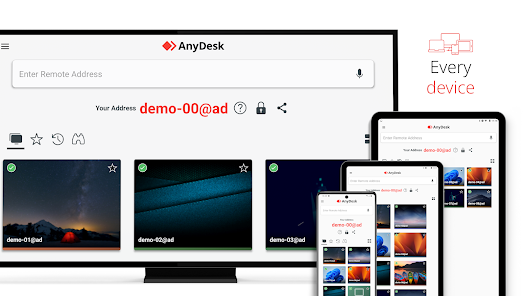
What is AnyDesk?
AnyDesk is a popular remote control software that allows users to access and control remote computers securely. It is designed for individuals, teams, and organizations to provide fast and reliable remote access to their computers, servers, and other devices. AnyDesk is known for its high-performance capabilities, low latency, and robust security features, making it an ideal solution for remote work, IT support, and other applications.
Main Features
Some of the key features of AnyDesk include:
- Fast and secure remote access to computers and servers
- Low latency and high-performance capabilities
- Robust security features, including encryption and secure channels
- Easy-to-use interface and intuitive navigation
- Cross-platform compatibility with Windows, macOS, Linux, and mobile devices
Installation Guide
Step 1: Download AnyDesk
To get started with AnyDesk, you need to download the software from the official website. Simply click on the download link and select the correct version for your operating system.
Step 2: Install AnyDesk
Once the download is complete, run the installer and follow the prompts to install AnyDesk on your computer. The installation process is straightforward and should only take a few minutes.
Step 3: Launch AnyDesk
After installation, launch AnyDesk and enter your license key or start a free trial. You will then be prompted to create a new session or join an existing one.
Technical Specifications
System Requirements
AnyDesk can run on a variety of operating systems, including Windows, macOS, and Linux. The minimum system requirements are:
| Operating System | RAM | Processor |
|---|---|---|
| Windows 10/8.1/8/7 | 2 GB | 1.6 GHz |
| macOS 10.12 or later | 2 GB | 1.6 GHz |
| Linux (Ubuntu, Debian, etc.) | 2 GB | 1.6 GHz |
Security Features
AnyDesk takes security seriously and offers a range of features to protect your remote sessions, including:
- End-to-end encryption using TLS 1.2
- Secure channels with AES-256 encryption
- Two-factor authentication
- Access controls and permissions
Pros and Cons
Pros
Some of the advantages of using AnyDesk include:
- Fast and reliable remote access
- Robust security features
- Easy-to-use interface
- Cross-platform compatibility
Cons
Some of the potential drawbacks of using AnyDesk include:
- Steep learning curve for advanced features
- Some users may experience connectivity issues
- Pricing plans can be confusing
FAQ
How do I get started with AnyDesk?
To get started with AnyDesk, simply download the software from the official website and follow the installation prompts. You can then launch AnyDesk and enter your license key or start a free trial.
Is AnyDesk secure?
Yes, AnyDesk takes security seriously and offers a range of features to protect your remote sessions, including end-to-end encryption, secure channels, and two-factor authentication.
What are the system requirements for AnyDesk?
The minimum system requirements for AnyDesk are 2 GB of RAM and a 1.6 GHz processor, and it can run on a variety of operating systems, including Windows, macOS, and Linux.