
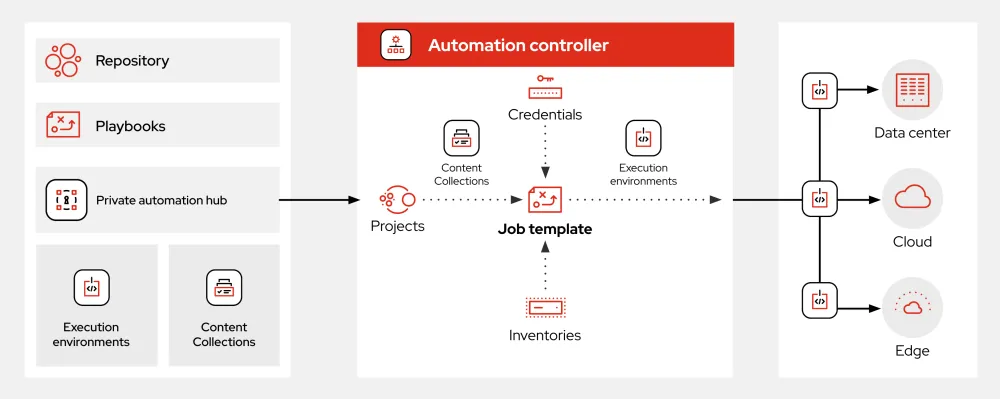
What is Ansible?
Ansible is an open-source automation tool that helps you manage and configure your infrastructure, deploy applications, and enforce security policies across your organization. It’s a powerful tool that uses a simple, human-readable language (YAML) to define and execute complex tasks. With Ansible, you can automate repetitive tasks, ensure consistency across your environment, and reduce the risk of human error.
Main Benefits of Ansible
Ansible offers several benefits, including:
- Agentless Architecture: Ansible doesn’t require any agents to be installed on the nodes it manages, making it a lightweight and flexible solution.
- Simple and Consistent Syntax: Ansible’s YAML syntax is easy to read and write, making it simple to define and execute complex tasks.
- Extensive Library of Modules: Ansible has a vast collection of modules that can be used to manage various aspects of your infrastructure, including networking, storage, and security.
How to Use Ansible
Getting Started with Ansible
To get started with Ansible, you’ll need to install it on your control node (the machine that will run Ansible). You can install Ansible on most Linux distributions using the package manager.
Installing Ansible on Ubuntu/Debian
To install Ansible on Ubuntu or Debian, run the following command:
sudo apt-get update && sudo apt-get install ansibleCreating Your First Ansible Playbook
A playbook is a YAML file that defines a set of tasks to be executed on a group of nodes. To create your first playbook, create a new file called example.yml and add the following content:
---
- name: Example Playbook
  hosts: all
  tasks:
    - name: Print Hello World
      debug:
        msg: 'Hello World'
Ansible Snapshot and Restore Workflow
Understanding Snapshots
A snapshot is a point-in-time copy of your infrastructure’s state. Ansible allows you to create snapshots of your nodes, which can be used to restore your infrastructure to a previous state in case something goes wrong.
Creating a Snapshot
To create a snapshot, you can use the ansible-snapshot command. For example:
ansible-snapshot create --name my-snapshotRestoring from a Snapshot
To restore from a snapshot, you can use the ansible-snapshot restore command. For example:
ansible-snapshot restore --name my-snapshotAnsible vs Alternatives
Comparison with Other Automation Tools
Ansible is often compared to other automation tools like Puppet, Chef, and SaltStack. While each tool has its strengths and weaknesses, Ansible is known for its simplicity, flexibility, and ease of use.
Key Differences
| Tool | Agentless | Complexity | Cost |
|---|---|---|---|
| Ansible | Yes | Low | Free |
| Puppet | No | Medium | Free/Paid |
| Chef | No | High | Free/Paid |
| SaltStack | Yes | Medium | Free/Paid |
Download Ansible Tutorial
Getting Started with Ansible
If you’re new to Ansible, we recommend downloading our comprehensive tutorial, which covers everything from installation to advanced topics like snapshot and restore workflows.
Conclusion
Ansible is a powerful automation tool that can help you manage and configure your infrastructure, deploy applications, and enforce security policies across your organization. With its simple and consistent syntax, extensive library of modules, and agentless architecture, Ansible is an ideal choice for organizations of all sizes.