
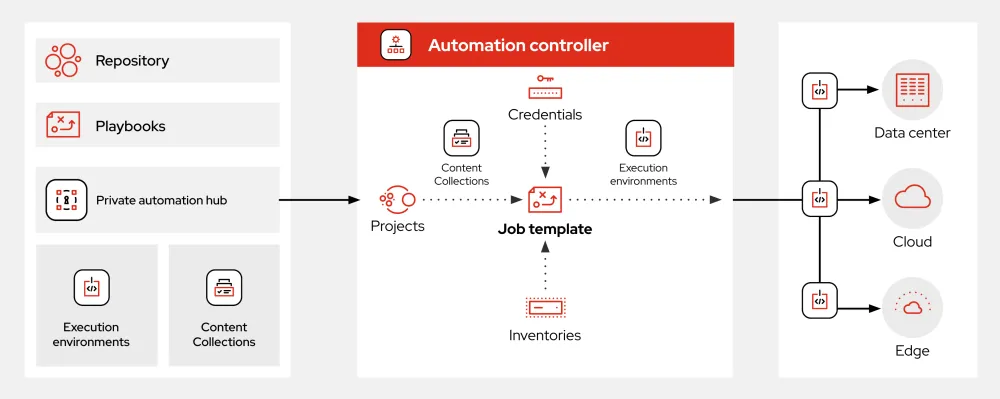
What is Ansible?
Ansible is an open-source automation tool that helps users automate their IT tasks, deploy software, and manage configurations across various environments. It uses a simple, agentless architecture that makes it easy to deploy and manage. Ansible is widely used in DevOps practices to automate the deployment of applications, manage infrastructure, and ensure consistency across environments.
Main Features of Ansible
Ansible has several key features that make it a popular choice for automation and configuration management. These features include:
- Agentless Architecture: Ansible does not require any agents to be installed on the nodes it manages. This makes it easy to deploy and manage.
- Playbooks: Ansible uses playbooks, which are YAML files that define the desired state of the system. Playbooks are human-readable and easy to understand.
- Modules: Ansible has a vast collection of modules that can be used to perform various tasks, such as managing users, installing packages, and configuring networks.
- Inventory Management: Ansible allows users to manage their inventory, which is a list of hosts that Ansible can manage.
Installation Guide
Installing Ansible is a straightforward process that can be completed in a few steps.
Step 1: Install Ansible on Your Control Node
Ansible can be installed on most Linux distributions using the package manager. For example, on Ubuntu, you can install Ansible using the following command:
sudo apt-get install ansible
Step 2: Configure Your Inventory
Once Ansible is installed, you need to configure your inventory. Your inventory is a list of hosts that Ansible can manage. You can define your inventory in a file called hosts in the /etc/ansible/ directory.
Step 3: Test Your Ansible Installation
Once you have configured your inventory, you can test your Ansible installation by running a simple command:
ansible -m ping all
Ansible Snapshot and Restore Workflow
Ansible provides a robust snapshot and restore workflow that allows users to take snapshots of their systems and restore them to a previous state if needed.
Creating a Snapshot
To create a snapshot, you can use the ansible-snapshot command. This command will create a snapshot of the current state of your system.
Restoring a Snapshot
To restore a snapshot, you can use the ansible-restore command. This command will restore the system to the state defined in the snapshot.
Technical Specifications
Ansible has several technical specifications that make it a powerful automation tool.
Supported Platforms
Ansible supports a wide range of platforms, including:
- Linux
- Windows
- macOS
Modules
Ansible has a vast collection of modules that can be used to perform various tasks. Some of the most commonly used modules include:
- apt: used to manage packages on Debian-based systems
- yum: used to manage packages on RPM-based systems
- service: used to manage services
Pros and Cons
Ansible has several pros and cons that should be considered before using it.
Pros
Some of the pros of using Ansible include:
- Easy to Use: Ansible is easy to use, even for users who are new to automation.
- Agentless Architecture: Ansible’s agentless architecture makes it easy to deploy and manage.
- Large Community: Ansible has a large and active community, which means there are many resources available.
Cons
Some of the cons of using Ansible include:
- Steep Learning Curve for Advanced Features: While Ansible is easy to use for simple tasks, it can be difficult to learn for more advanced features.
- Limited Windows Support: Ansible’s support for Windows is limited compared to its support for Linux.
FAQ
Here are some frequently asked questions about Ansible.
Q: What is Ansible used for?
A: Ansible is used for automation, configuration management, and deployment.
Q: Is Ansible free?
A: Yes, Ansible is open-source and free to use.
Q: Does Ansible support Windows?
A: Yes, Ansible supports Windows, but its support is limited compared to its support for Linux.
Conclusion
Ansible is a powerful automation tool that can be used to automate a wide range of tasks. Its agentless architecture, playbooks, and modules make it easy to use and manage. While it has some limitations, Ansible is a popular choice for DevOps practices and is widely used in the industry. With its robust snapshot and restore workflow, Ansible provides a reliable way to manage and restore systems.