
What is Ansible?
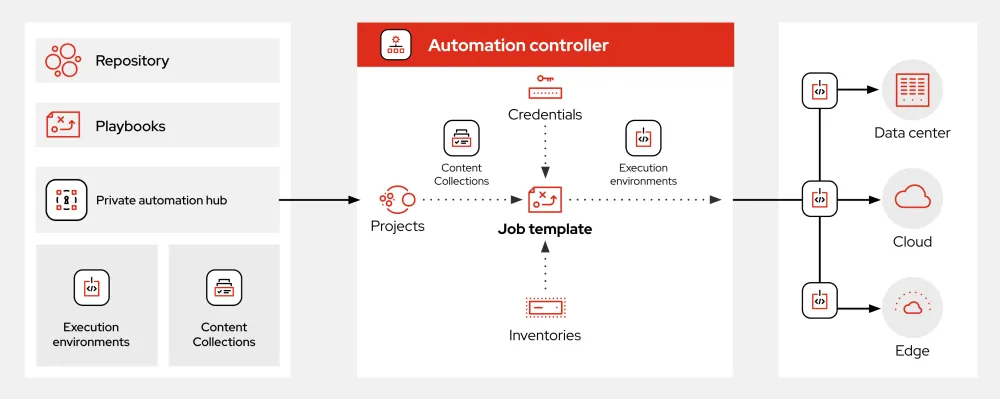
Ansible is an open-source automation tool that helps in configuration management, application deployment, and task automation. It is designed to be simple, efficient, and easy to use, making it a popular choice among system administrators and DevOps teams. Ansible uses a simple, human-readable syntax in the form of YAML or JSON files, making it easy to define and manage complex workflows.
Main Features of Ansible
Some of the key features of Ansible include:
- Agentless Architecture: Ansible does not require any agents to be installed on the nodes it manages, making it a lightweight and easy-to-deploy solution.
- Playbooks: Ansible playbooks are used to define and manage complex workflows. They are written in YAML or JSON and can be reused across multiple environments.
- Modules: Ansible has a vast collection of modules that can be used to perform a wide range of tasks, from simple file management to complex application deployment.
Installation Guide
Prerequisites
Before installing Ansible, you will need to ensure that your system meets the following prerequisites:
- Python 2.7 or later: Ansible requires Python 2.7 or later to be installed on the system.
- SSH access: Ansible uses SSH to connect to the nodes it manages, so you will need to ensure that SSH access is enabled on your system.
Installation Steps
Once you have ensured that your system meets the prerequisites, you can follow these steps to install Ansible:
- Install Ansible using pip: You can install Ansible using pip by running the following command:
pip install ansible - Verify the installation: Once the installation is complete, you can verify that Ansible has been installed correctly by running the following command:
ansible --version
Ansible Snapshot and Restore Workflow
What is a Snapshot?
A snapshot is a point-in-time copy of a system or application. Ansible provides a snapshot and restore feature that allows you to create and manage snapshots of your systems and applications.
How to Create a Snapshot
To create a snapshot using Ansible, you can use the snapshot module. Here is an example of how to create a snapshot:
---
- name: Create a snapshot
  hosts: myserver
  tasks:
  - name: Create a snapshot
    snapshot:
      state: present
      name: my-snapshot
Ansible vs Alternatives
Comparison with Other Automation Tools
Ansible is one of many automation tools available in the market. Here is a comparison of Ansible with some of its alternatives:
| Feature | Ansible | Puppet | Chef |
|---|---|---|---|
| Agentless Architecture | Yes | No | No |
| Playbooks | Yes | No | No |
| Modules | Yes | Yes | Yes |
FAQ
What is the difference between Ansible and Ansible Tower?
Ansible and Ansible Tower are two separate products. Ansible is an open-source automation tool, while Ansible Tower is a commercial product that provides a web-based interface for managing Ansible playbooks.
How do I download the Ansible tutorial?
You can download the Ansible tutorial from the official Ansible website.