
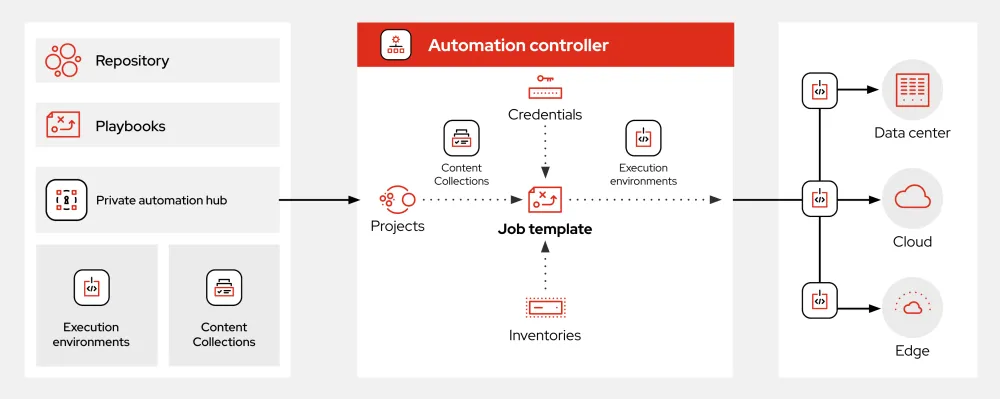
What is Ansible?
Ansible is an open-source software automation tool that helps you manage and configure your infrastructure, deploy applications, and enforce security policies across your organization. It’s designed to be simple, yet powerful, and can be used for a wide range of tasks, from basic configuration management to complex multi-step deployments.
With Ansible, you can automate repetitive tasks, reduce downtime, and improve consistency across your infrastructure. It’s also highly extensible, with a large collection of modules and plugins available to help you automate specific tasks and integrate with other tools.
Main Features of Ansible
Some of the key features of Ansible include:
- Agentless Architecture: Ansible doesn’t require any agents to be installed on the nodes it manages, making it easy to get started and reducing the overhead of managing agents.
- Playbooks: Ansible’s playbooks are YAML files that define the desired state of your infrastructure. They’re easy to read and write, and can be reused across multiple environments.
- Modules: Ansible has a vast collection of modules that can be used to automate specific tasks, such as managing users, installing packages, and configuring networks.
- Roles: Ansible’s roles provide a way to organize playbooks and modules into reusable components that can be easily applied to different environments.
Installation Guide
Prerequisites
Before installing Ansible, you’ll need to make sure you have the following prerequisites in place:
- Python 3.8 or later: Ansible requires Python 3.8 or later to run.
- Linux or macOS: Ansible can run on Linux or macOS, but not on Windows.
- SSH access: Ansible uses SSH to connect to the nodes it manages, so you’ll need to have SSH access to those nodes.
Installation Steps
To install Ansible, follow these steps:
- Install the Ansible package: You can install Ansible using pip, the Python package manager. Run the following command to install Ansible:
pip install ansible - Verify the installation: Once the installation is complete, verify that Ansible is working correctly by running the following command:
ansible --version - Configure Ansible: Ansible has a number of configuration options that you can use to customize its behavior. You can configure Ansible by creating a configuration file in the
~/.ansible.cfgdirectory.
Ansible Snapshot and Restore Workflow
What is a Snapshot?
In Ansible, a snapshot is a point-in-time representation of your infrastructure. It’s a way to capture the current state of your infrastructure, including the configuration of all the nodes, so that you can easily restore to that state if something goes wrong.
How to Create a Snapshot
To create a snapshot in Ansible, you’ll need to use the ansible-snapshot module. This module allows you to create a snapshot of your infrastructure, including the configuration of all the nodes.
Here’s an example of how to use the ansible-snapshot module to create a snapshot:
---
- name: Create a snapshot of the infrastructure
  hosts: all
  tasks:
  - name: Create a snapshot
    ansible_snapshot:
      name: my-snapshot
      description: Snapshot of the infrastructure
      state: present
How to Restore from a Snapshot
To restore from a snapshot in Ansible, you’ll need to use the ansible-restore module. This module allows you to restore your infrastructure to a previous state, based on a snapshot.
Here’s an example of how to use the ansible-restore module to restore from a snapshot:
---
- name: Restore from a snapshot
  hosts: all
  tasks:
  - name: Restore from the snapshot
    ansible_restore:
      name: my-snapshot
      state: present
Ansible vs Alternatives
What are the Alternatives to Ansible?
There are a number of alternatives to Ansible, including:
- Puppet: Puppet is another popular automation tool that allows you to manage and configure your infrastructure.
- Chef: Chef is a configuration management tool that allows you to automate the deployment and management of your infrastructure.
- SaltStack: SaltStack is an automation tool that allows you to manage and configure your infrastructure, as well as enforce security policies.
How Does Ansible Compare to Alternatives?
Ansible is often compared to Puppet and Chef, as all three tools are designed to help you automate and manage your infrastructure. However, Ansible has a number of advantages over these alternatives, including:
- Agentless Architecture: Ansible’s agentless architecture makes it easy to get started and reduces the overhead of managing agents.
- Simple and Easy to Use: Ansible’s playbooks are easy to read and write, making it simple to automate complex tasks.
- Highly Extensible: Ansible has a large collection of modules and plugins available, making it highly extensible and customizable.
FAQ
What is Ansible used for?
Ansible is used for automating and managing infrastructure, deploying applications, and enforcing security policies.
How does Ansible work?
Ansible works by using playbooks to define the desired state of your infrastructure. It then uses these playbooks to automate the deployment and management of your infrastructure.
Is Ansible free?
Yes, Ansible is free and open-source software. It’s available under the GNU General Public License (GPL).