
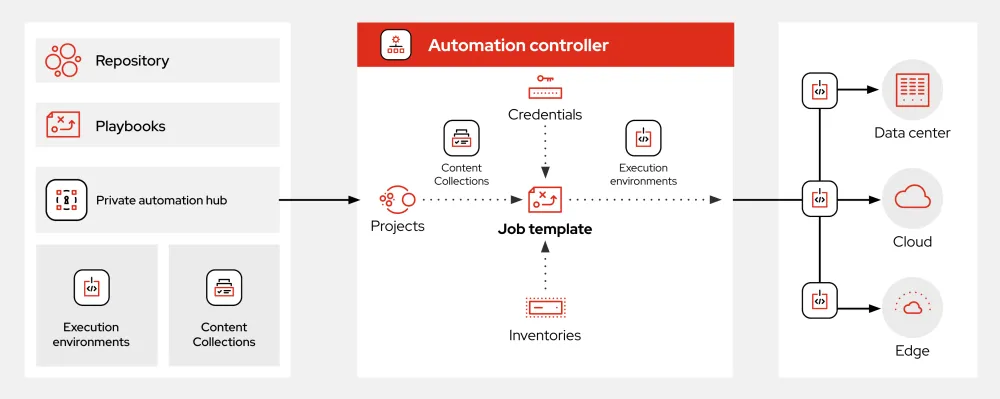
What is Ansible?
Ansible is an open-source automation tool that helps you automate and manage your infrastructure, applications, and configurations. It is a powerful tool that allows you to define and enforce the desired state of your infrastructure and applications using simple, human-readable playbooks. With Ansible, you can automate repetitive tasks, deploy applications, and manage complex environments with ease.
Ansible uses a simple, agentless architecture that eliminates the need for additional software or agents on the nodes being managed. This makes it easy to get started with Ansible and reduces the overhead of managing additional software.
Key Features
Agentless Architecture
Ansible’s agentless architecture means that you don’t need to install any additional software on the nodes being managed. This makes it easy to get started with Ansible and reduces the overhead of managing additional software.
Human-Readable Playbooks
Ansible playbooks are written in a simple, human-readable format that makes it easy to define and enforce the desired state of your infrastructure and applications.
Large Community
Ansible has a large and active community of users and contributors, which means there are many pre-built playbooks and modules available to help you get started.
Installation Guide
Step 1: Install Ansible
To install Ansible, you can use your distribution’s package manager or install it from source. On Ubuntu-based systems, you can install Ansible using the following command:
sudo apt-get install ansible
Step 2: Configure Ansible
Once Ansible is installed, you need to configure it by creating a configuration file. The configuration file is usually located at /etc/ansible/ansible.cfg.
Step 3: Create a Playbook
A playbook is a file that defines the desired state of your infrastructure and applications. You can create a playbook using a text editor or an IDE.
Ansible Snapshot and Restore Workflow
What is a Snapshot?
A snapshot is a point-in-time image of your infrastructure and applications. Ansible allows you to create snapshots of your environment, which can be used to restore your environment to a previous state if something goes wrong.
How to Create a Snapshot
To create a snapshot, you can use the ansible-snapshot module. This module allows you to create a snapshot of your environment and save it to a file.
How to Restore from a Snapshot
To restore from a snapshot, you can use the ansible-restore module. This module allows you to restore your environment from a snapshot file.
Ansible vs Alternatives
Puppet
Puppet is another popular automation tool that is often compared to Ansible. While both tools share some similarities, Ansible is generally easier to use and has a more human-readable syntax.
Chef
Chef is another popular automation tool that is often compared to Ansible. While Chef has a more comprehensive feature set, Ansible is generally easier to use and has a more active community.
FAQ
What is the difference between Ansible and Ansible Tower?
Ansible Tower is a web-based interface for Ansible that provides additional features such as user management, inventory management, and job scheduling.
How do I get started with Ansible?
To get started with Ansible, you can download the Ansible tutorial and work through the examples. You can also join the Ansible community to ask questions and get help.