
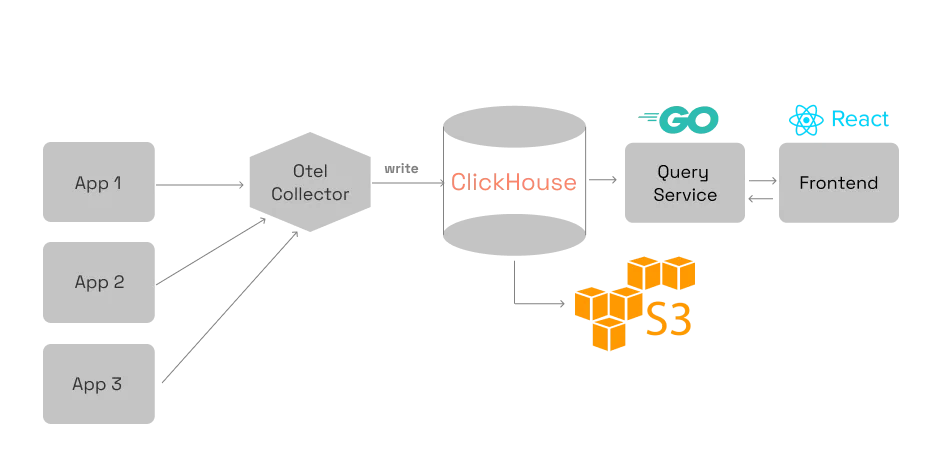
What is SigNoz?
SigNoz is an open-source application monitoring and logging tool designed to provide a unified view of your application’s performance and logs. It offers a robust platform for enterprises to monitor, analyze, and troubleshoot their applications with ease. With SigNoz, you can gain insights into your application’s behavior, identify bottlenecks, and optimize its performance.
Main Features of SigNoz
SigNoz offers a wide range of features that make it an ideal choice for enterprise ops orchestration and monitoring. Some of its key features include:
- Telemetry Data Collection: SigNoz collects telemetry data from your application, providing you with real-time insights into its performance.
- Log Management: SigNoz offers a robust log management system that allows you to store, search, and analyze your application’s logs.
- Snapshot and Restore Workflow: SigNoz’s snapshot and restore workflow feature enables you to take snapshots of your application’s state and restore it to a previous state in case of issues.
Installation Guide
Prerequisites
Before installing SigNoz, ensure you have the following prerequisites:
- Docker: SigNoz uses Docker for containerization, so ensure you have Docker installed on your system.
- Linux OS: SigNoz is compatible with Linux-based operating systems.
Step-by-Step Installation Process
Here’s a step-by-step guide to installing SigNoz:
- Download the SigNoz Docker image: You can download the SigNoz Docker image from the official SigNoz repository.
- Run the SigNoz container: Run the SigNoz container using the Docker run command.
- Configure SigNoz: Configure SigNoz by updating the configuration file and restarting the container.
Technical Specifications
System Requirements
SigNoz requires the following system specifications:
| Component | Requirement |
|---|---|
| CPU | 2 cores |
| RAM | 4 GB |
| Storage | 50 GB |
Compatibility
SigNoz is compatible with the following operating systems and technologies:
- Linux OS: SigNoz is compatible with Linux-based operating systems.
- Docker: SigNoz uses Docker for containerization.
Pros and Cons
Pros
SigNoz offers several advantages, including:
- Unified View: SigNoz provides a unified view of your application’s performance and logs.
- Scalability: SigNoz is designed to scale with your application.
Cons
SigNoz has some limitations, including:
- Steep Learning Curve: SigNoz requires technical expertise to set up and configure.
- Resource-Intensive: SigNoz requires significant system resources to run.
FAQ
What is the difference between SigNoz and alternatives?
SigNoz is an open-source application monitoring and logging tool that offers a unified view of your application’s performance and logs. While there are other alternatives available, SigNoz stands out for its scalability, flexibility, and ease of use.
How do I download the SigNoz tutorial?
You can download the SigNoz tutorial from the official SigNoz website.
What is the snapshot and restore workflow in SigNoz?
The snapshot and restore workflow feature in SigNoz enables you to take snapshots of your application’s state and restore it to a previous state in case of issues.