
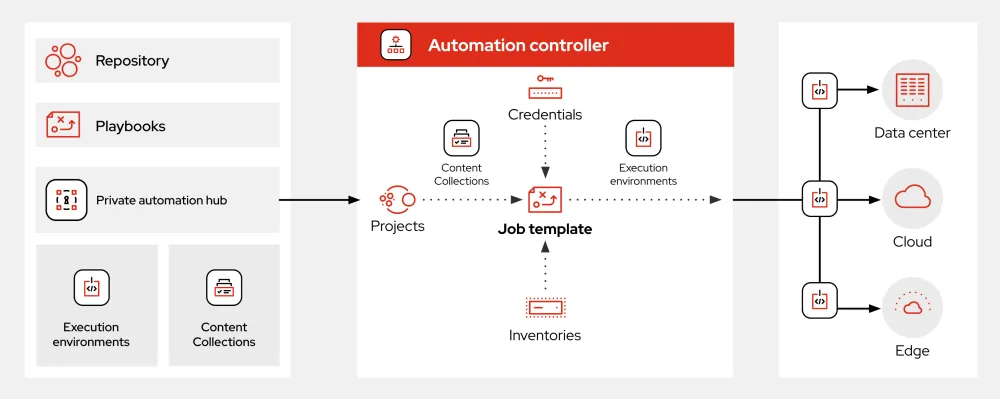
What is Ansible?
Ansible is an open-source software that automates software provisioning, configuration management, and application deployment. It is a powerful tool that helps system administrators and DevOps teams manage and automate their infrastructure and applications. Ansible uses a simple, agentless architecture that makes it easy to deploy and manage nodes. It also uses a human-readable YAML syntax for its playbooks, which makes it easy to write and understand automation scripts.
Main Features of Ansible
Some of the main features of Ansible include:
- Agentless Architecture: Ansible does not require any agents to be installed on the nodes it manages. This makes it easy to deploy and manage nodes.
- Human-Readable YAML Syntax: Ansible playbooks are written in a human-readable YAML syntax, which makes it easy to write and understand automation scripts.
- Extensive Library of Modules: Ansible has an extensive library of modules that can be used to automate various tasks, such as user management, package management, and file management.
Installation Guide
Prerequisites
Before installing Ansible, make sure you have the following prerequisites:
- Python 2.7 or 3.5+: Ansible requires Python 2.7 or 3.5+ to be installed on the control node.
- SSH Access: Ansible requires SSH access to the nodes it manages.
Installation Steps
Here are the steps to install Ansible:
- Install Ansible on the Control Node: You can install Ansible on the control node using pip:
pip install ansible - Install Ansible on the Managed Nodes: You do not need to install Ansible on the managed nodes. Ansible will use SSH to connect to the nodes and execute the playbooks.
Technical Specifications
System Requirements
Here are the system requirements for Ansible:
| Component | Requirement |
|---|---|
| Control Node | Python 2.7 or 3.5+ |
| Managed Nodes | SSH access |
Pros and Cons
Pros
Some of the pros of using Ansible include:
- Easy to Use: Ansible is easy to use, even for those without extensive programming knowledge.
- Agentless Architecture: Ansible’s agentless architecture makes it easy to deploy and manage nodes.
- Extensive Library of Modules: Ansible has an extensive library of modules that can be used to automate various tasks.
Cons
Some of the cons of using Ansible include:
- Steep Learning Curve for Advanced Features: While Ansible is easy to use for simple tasks, it can have a steep learning curve for advanced features.
- Dependent on SSH: Ansible is dependent on SSH for connectivity, which can be a security risk if not properly configured.
Ansible vs Alternatives
Comparison with Other Automation Tools
Ansible is often compared to other automation tools such as Puppet, Chef, and SaltStack. Here’s a brief comparison:
| Tool | Agentless Architecture | Human-Readable Syntax |
|---|---|---|
| Ansible | Yes | Yes |
| Puppet | No | No |
| Chef | No | No |
| SaltStack | Yes | No |
FAQ
Frequently Asked Questions
Here are some frequently asked questions about Ansible:
- Q: What is Ansible?
A: Ansible is an open-source software that automates software provisioning, configuration management, and application deployment. - Q: How does Ansible work?
A: Ansible uses a simple, agentless architecture that makes it easy to deploy and manage nodes. It also uses a human-readable YAML syntax for its playbooks.
Conclusion
Ansible is a powerful tool that helps system administrators and DevOps teams manage and automate their infrastructure and applications. Its agentless architecture, human-readable YAML syntax, and extensive library of modules make it an ideal choice for automation tasks. However, it can have a steep learning curve for advanced features, and it is dependent on SSH for connectivity.