
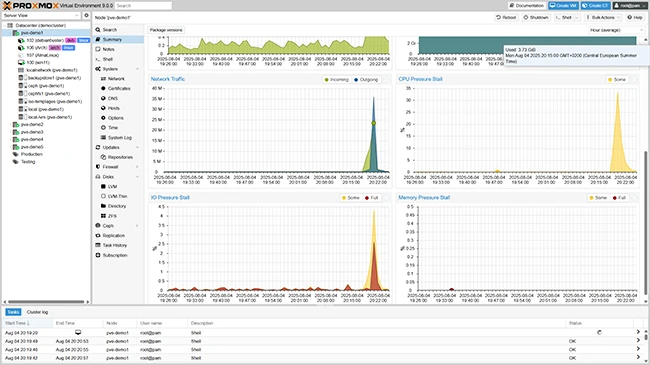
What is Proxmox VE?
Proxmox VE (Virtual Environment) is an open-source server virtualization platform that enables you to create, manage, and monitor virtual machines (VMs) and containers. It is a popular choice among system administrators and IT professionals due to its ease of use, flexibility, and scalability. Proxmox VE is built on top of Debian Linux and uses KVM (Kernel-based Virtual Machine) and LXC (Linux Containers) as its virtualization technologies.
Key Features
Virtualization and Containerization
Proxmox VE supports both KVM and LXC, allowing you to create and manage virtual machines and containers. This enables you to run multiple operating systems and applications on a single physical host, improving resource utilization and reducing costs.
High Availability and Clustering
Proxmox VE provides high availability and clustering features, ensuring that your virtual machines and containers are always available and can be easily scaled up or down as needed.
Centralized Management
The Proxmox VE web interface provides a centralized management platform for all your virtual machines, containers, and storage. You can easily create, clone, and manage your VMs and containers, as well as monitor their performance and resource usage.
Installation Guide
System Requirements
Before installing Proxmox VE, ensure that your system meets the minimum requirements, including a 64-bit CPU, at least 2GB of RAM, and a supported Linux distribution.
Download and Installation
Download the Proxmox VE ISO file from the official website and create a bootable USB drive. Install Proxmox VE on your server, following the on-screen instructions.
Initial Configuration
After installation, configure your Proxmox VE server by setting up the network, storage, and authentication. You can also configure the web interface and set up additional features such as clustering and high availability.
Proxmox VE Snapshot and Restore Workflow
Creating Snapshots
Proxmox VE allows you to create snapshots of your virtual machines and containers, enabling you to easily roll back to a previous state in case of errors or changes.
Restoring Snapshots
To restore a snapshot, simply select the snapshot you want to restore and click the