
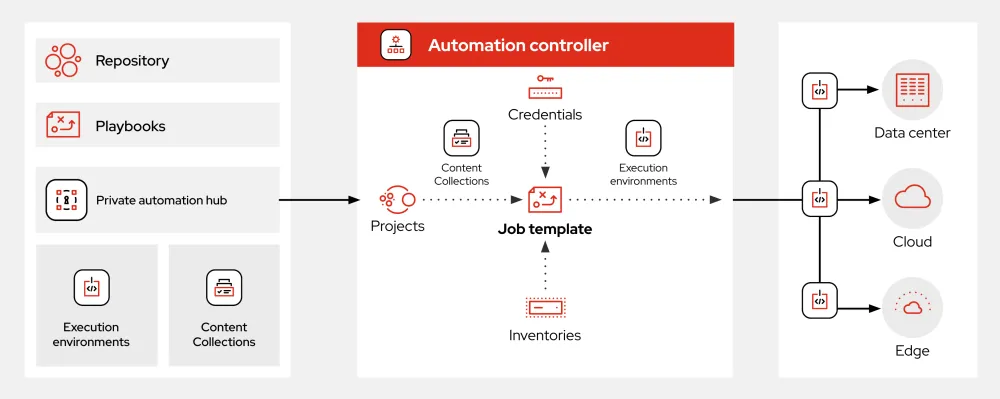
What is Ansible?
Ansible is an open-source automation tool that helps you manage and configure your infrastructure, applications, and services. It uses a simple, agentless architecture that makes it easy to deploy and manage your environment. With Ansible, you can automate repetitive tasks, manage complex deployments, and ensure consistency across your infrastructure.
Main Features of Ansible
Ansible has several key features that make it a popular choice for automation and configuration management. Some of the main features include:
- Agentless Architecture: Ansible doesn’t require any agents to be installed on the nodes it manages. This makes it easy to deploy and manage your environment.
- Simple and Easy to Use: Ansible uses a simple, human-readable syntax that makes it easy to create and manage playbooks.
- Extensive Library of Modules: Ansible has a vast library of modules that make it easy to manage and configure your infrastructure and applications.
Installation Guide
Prerequisites
Before you can install Ansible, you need to ensure that your system meets the following prerequisites:
- Python 2.7 or later: Ansible requires Python 2.7 or later to be installed on your system.
- pip: You need to have pip installed on your system to install Ansible.
Installation Steps
Once you have met the prerequisites, you can install Ansible using the following steps:
- Install Ansible using pip: You can install Ansible using pip by running the following command:
pip install ansible - Verify the installation: Once the installation is complete, you can verify that Ansible is installed correctly by running the following command:
ansible --version
Ansible Snapshot and Restore Workflow
What is a Snapshot?
A snapshot is a point-in-time copy of your infrastructure and applications. Ansible allows you to create snapshots of your environment, which can be used to restore your environment to a previous state in case of a failure or disaster.
How to Create a Snapshot
Creating a snapshot in Ansible is a straightforward process. You can create a snapshot by running the following command:
ansible-playbook -i inventory snapshot.yml
How to Restore from a Snapshot
Restoring from a snapshot in Ansible is also a straightforward process. You can restore from a snapshot by running the following command:
ansible-playbook -i inventory restore.yml
Pros and Cons of Ansible
Pros of Ansible
Ansible has several pros that make it a popular choice for automation and configuration management. Some of the pros include:
- Easy to Use: Ansible is easy to use, even for users who are new to automation and configuration management.
- Extensive Library of Modules: Ansible has a vast library of modules that make it easy to manage and configure your infrastructure and applications.
- Agentless Architecture: Ansible’s agentless architecture makes it easy to deploy and manage your environment.
Cons of Ansible
Ansible also has some cons that you should be aware of. Some of the cons include:
- Steep Learning Curve for Advanced Features: While Ansible is easy to use for simple tasks, it can have a steep learning curve for advanced features.
- Limited Support for Windows: Ansible has limited support for Windows, which can make it difficult to manage and configure Windows environments.
FAQ
What is the difference between Ansible and other automation tools?
Ansible is different from other automation tools in that it uses an agentless architecture and has a simple, easy-to-use syntax.
How do I get started with Ansible?
To get started with Ansible, you can download the Ansible tutorial and follow the installation guide.
What is the Ansible vs alternatives debate?
The Ansible vs alternatives debate is a discussion about the pros and cons of using Ansible compared to other automation tools. Some of the alternatives to Ansible include Puppet, Chef, and SaltStack.