
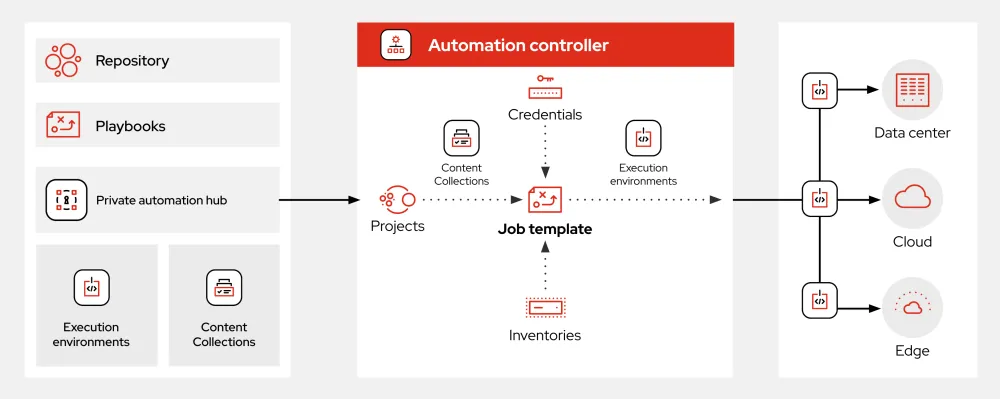
What is Ansible?
Ansible is an open-source automation tool that helps users automate tasks and workflows by using a simple and easy-to-learn language called YAML (YAML Ain’t Markup Language). It is widely used for automation and scripting in the IT industry. Ansible helps in automating repetitive tasks, deploying applications, and managing infrastructure. With Ansible, users can create playbooks, which are files that contain a series of tasks to be executed on a specific host or group of hosts.
Benefits of Using Ansible
Ansible has several benefits, including ease of use, flexibility, and scalability. It also supports a wide range of operating systems and applications. Additionally, Ansible has a large community of users and developers who contribute to its growth and development.
Installation Guide
Prerequisites
Before installing Ansible, you need to ensure that your system meets the following requirements:
- Python 3.6 or later
- Linux or macOS operating system
- pip package manager
Installation Steps
Here are the steps to install Ansible on your system:
- Update your package list using the command sudo apt update (for Ubuntu-based systems) or sudo yum update (for RHEL-based systems).
- Install Ansible using the command sudo apt install ansible (for Ubuntu-based systems) or sudo yum install ansible (for RHEL-based systems).
- Verify the installation by running the command ansible –version.
Ansible Snapshot and Restore Workflow
Creating a Snapshot
To create a snapshot of your Ansible configuration, you can use the ansible-snapshot command. This command creates a backup of your Ansible configuration, including your playbooks, inventory, and variables.
Example
ansible-snapshot create my_snapshot
Restoring a Snapshot
To restore a snapshot of your Ansible configuration, you can use the ansible-snapshot command with the restore option. This command restores your Ansible configuration from a previously created snapshot.
Example
ansible-snapshot restore my_snapshot
Technical Specifications
Supported Operating Systems
Ansible supports a wide range of operating systems, including:
- Linux (Ubuntu, RHEL, CentOS, etc.)
- macOS
- Windows
Supported Applications
Ansible supports a wide range of applications, including:
- Web servers (Apache, Nginx, etc.)
- Databases (MySQL, PostgreSQL, etc.)
- Cloud providers (AWS, Azure, etc.)
Pros and Cons
Pros
Ansible has several pros, including:
- Easy to use and learn
- Flexible and scalable
- Supports a wide range of operating systems and applications
Cons
Ansible has several cons, including:
- Steep learning curve for advanced features
- Limited support for Windows operating systems
- Can be slower than other automation tools
FAQ
What is the difference between Ansible and other automation tools?
Ansible is different from other automation tools in that it uses a simple and easy-to-learn language called YAML. It also supports a wide range of operating systems and applications.
How do I get started with Ansible?
To get started with Ansible, you can download the Ansible tutorial from the official Ansible website. You can also join the Ansible community to connect with other users and developers.
What are the system requirements for Ansible?
The system requirements for Ansible include Python 3.6 or later, Linux or macOS operating system, and pip package manager.