
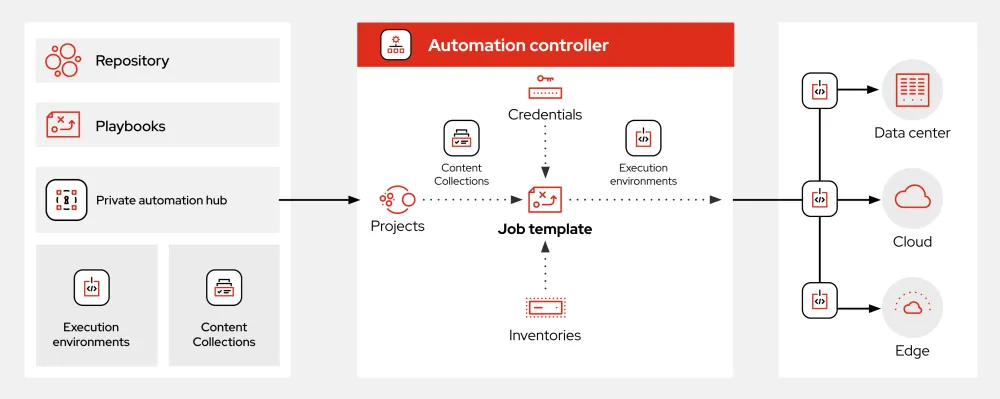
What is Ansible?
Ansible is an open-source automation tool that simplifies the process of managing and configuring infrastructure, applications, and services. It uses a simple, agentless architecture to automate tasks and workflows, making it an ideal solution for DevOps teams and system administrators. With Ansible, users can automate repetitive tasks, enforce consistency across environments, and improve overall efficiency.
Key Features
Agentless Architecture
Ansible’s agentless architecture means that it doesn’t require any additional software to be installed on the nodes it manages. This reduces the overhead and complexity associated with traditional agent-based solutions.
Declarative Configuration
Ansible uses a declarative configuration model, which means that users define the desired state of their infrastructure and applications, rather than the steps needed to achieve that state. This approach makes it easier to manage complex environments and ensures consistency across multiple nodes.
Playbooks
Ansible playbooks are YAML files that define a series of tasks and workflows. They can be used to automate complex tasks, such as deploying applications, configuring networks, and managing user accounts.
Installation Guide
Prerequisites
Before installing Ansible, ensure that you have Python 3.6 or later installed on your system.
Installing Ansible
Ansible can be installed using pip, the Python package manager. Run the following command to install Ansible: pip install ansible
Verifying the Installation
Once the installation is complete, verify that Ansible is working correctly by running the command ansible --version
Ansible Snapshot and Restore Workflow
Capturing Snapshots
Ansible provides a built-in mechanism for capturing snapshots of your infrastructure and applications. This allows you to create a point-in-time snapshot of your environment, which can be used for backup and recovery purposes.
Restoring from Snapshots
In the event of a failure or disaster, Ansible allows you to restore your environment from a previous snapshot. This process involves re-applying the configuration and state defined in the snapshot.
Ansible vs Alternatives
Comparison with Puppet
Ansible and Puppet are both popular automation tools, but they differ in their approach and architecture. Ansible’s agentless architecture and declarative configuration model give it an edge over Puppet in terms of simplicity and ease of use.
Comparison with Chef
Chef is another popular automation tool that uses a Ruby-based DSL to define infrastructure and applications. Ansible’s YAML-based playbooks are generally easier to read and write than Chef’s Ruby code.
Conclusion
Ansible is a powerful automation tool that simplifies the process of managing and configuring infrastructure, applications, and services. Its agentless architecture, declarative configuration model, and playbook-based workflow make it an ideal solution for DevOps teams and system administrators. With Ansible, users can automate repetitive tasks, enforce consistency across environments, and improve overall efficiency.