
What is Ansible?
Ansible is an open-source software tool that helps in configuration management, application deployment, and task automation. It is a powerful tool that helps in streamlining the process of setting up and managing IT infrastructure and applications. Ansible is written in Python and uses a declarative configuration file to define the desired state of the infrastructure. It then uses this file to set up and configure the infrastructure, making sure it matches the desired state.
History of Ansible
Ansible was first released in 2012 by Michael DeHaan, the founder of AnsibleWorks. It was later acquired by Red Hat in 2015. Since then, Ansible has become one of the most popular configuration management tools used in DevOps and IT operations.
Key Features of Ansible
Ansible has several key features that make it a powerful tool for configuration management and application deployment. Some of the key features include:
- Agentless Architecture: Ansible does not require any agent to be installed on the nodes. It uses SSH for communication with the nodes.
- Declarative Language: Ansible uses a declarative language to define the desired state of the infrastructure. This makes it easy to use and understand.
- Playbooks: Ansible playbooks are used to define the desired state of the infrastructure. Playbooks are written in YAML and are easy to read and understand.
- Roles: Ansible roles are used to group playbooks together. Roles make it easy to manage complex infrastructure and applications.
Installation Guide
Step 1: Prerequisites
Before you can install Ansible, you need to make sure you have the following prerequisites:
- Python 2.6 or later
- Python 3.5 or later
- Ansible 2.4 or later
Step 2: Install Ansible
Ansible can be installed using pip or from source. The following command can be used to install Ansible using pip:
pip install ansible
Step 3: Verify Ansible Installation
After you have installed Ansible, you need to verify that it is working correctly. The following command can be used to verify Ansible:
ansible –version
Technical Specifications
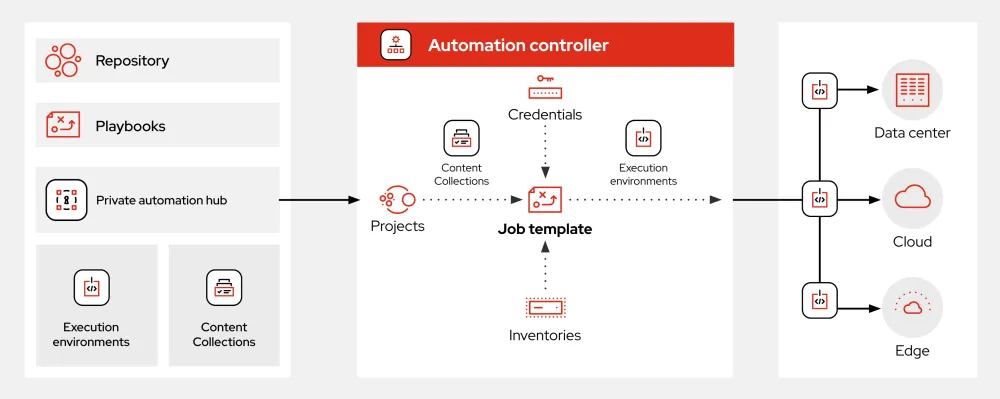
Ansible Architecture
Ansible uses a client-server architecture. The Ansible server is used to manage the nodes, and the nodes are the machines that are being managed.
Ansible Playbooks
Ansible playbooks are written in YAML and are used to define the desired state of the infrastructure. Playbooks are used to define the tasks that need to be performed on the nodes.
Pros and Cons
Pros of Ansible
Ansible has several pros that make it a popular choice for configuration management and application deployment. Some of the pros include:
- Easy to use: Ansible is easy to use and understand. It uses a declarative language to define the desired state of the infrastructure.
- Agentless architecture: Ansible does not require any agent to be installed on the nodes. It uses SSH for communication with the nodes.
- Playbooks: Ansible playbooks are used to define the desired state of the infrastructure. Playbooks are written in YAML and are easy to read and understand.
Cons of Ansible
Ansible also has several cons that need to be considered. Some of the cons include:
- Steep learning curve: Ansible has a steep learning curve. It requires knowledge of YAML and Ansible playbooks.
- Complexity: Ansible can be complex to use. It requires knowledge of Ansible playbooks and roles.
FAQ
What is Ansible?
Ansible is an open-source software tool that helps in configuration management, application deployment, and task automation.
What are the key features of Ansible?
Ansible has several key features that make it a powerful tool for configuration management and application deployment. Some of the key features include agentless architecture, declarative language, playbooks, and roles.
What are the pros and cons of Ansible?
Ansible has several pros and cons. Some of the pros include easy to use, agentless architecture, and playbooks. Some of the cons include steep learning curve and complexity.
How do I install Ansible?
Ansible can be installed using pip or from source. The following command can be used to install Ansible using pip: pip install ansible
How do I verify Ansible installation?
After you have installed Ansible, you need to verify that it is working correctly. The following command can be used to verify Ansible: ansible –version