
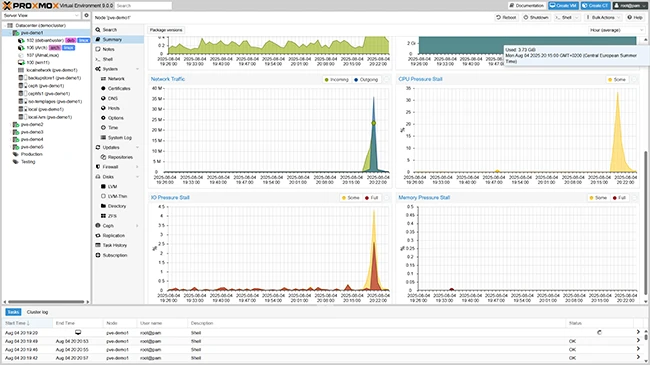
What is Proxmox VE?
Proxmox VE is an open-source virtualization platform that enables users to create, manage, and deploy virtual machines and containers. It is a powerful tool for system administrators and IT professionals who need to manage multiple virtual environments. Proxmox VE provides a centralized management interface, making it easy to manage virtual machines, containers, and storage resources.
Main Features of Proxmox VE
Some of the key features of Proxmox VE include:
- Support for KVM and LXC containers
- Centralized management interface
- High availability and clustering
- Live migration and backup
- Support for various storage options
Installation Guide
Installing Proxmox VE is a straightforward process that can be completed in a few steps.
Step 1: Download the Installation ISO
The first step is to download the Proxmox VE installation ISO from the official website.
Step 2: Create a Bootable USB Drive
Once the ISO is downloaded, create a bootable USB drive using a tool like Rufus or Etcher.
Step 3: Boot from the USB Drive
Insert the USB drive into the server and boot from it.
Step 4: Follow the Installation Wizard
The installation wizard will guide you through the installation process, which includes selecting the language, timezone, and network settings.
Technical Specifications
Proxmox VE has the following technical specifications:
| Component | Specification |
|---|---|
| Operating System | Debian-based Linux |
| Processor | 64-bit x86 processor |
| Memory | 4 GB or more |
| Storage | 10 GB or more |
Pros and Cons
Like any other virtualization platform, Proxmox VE has its pros and cons.
Pros
Some of the advantages of using Proxmox VE include:
- Open-source and free
- Highly customizable
- Support for KVM and LXC containers
- Centralized management interface
Cons
Some of the disadvantages of using Proxmox VE include:
- Steep learning curve
- Limited support for certain hardware
- Not as user-friendly as some other virtualization platforms
Proxmox VE Snapshot and Restore Workflow
Proxmox VE provides a robust snapshot and restore feature that enables users to create and manage snapshots of their virtual machines and containers.
Creating a Snapshot
To create a snapshot, follow these steps:
- Log in to the Proxmox VE web interface
- Select the virtual machine or container
- Click on the